
Finalising Invoices on the FoodByUs Dashboard
The finalise payment tool allows you to adjust orders for any out of stocks, random weights or substitutions so that customers are accurately charged. Orders must be finalised within 48 business hours of delivery.
How to finalise your invoices
1. To finalise an invoice, log into your dashboard and navigate to “Orders & Payments”.
2. Find the invoice you need to adjust by using the delivery date filter, or by entering the Order Reference or Buyer Name in the search bar.

3. To adjust an invoice, click finalise payment (note, the order must first be confirmed before you can finalise).
4. Start by entering your invoice number at the top, in the 'Your Invoice Number' field. This will ensure that your invoice number appears on the FoodByUs remittance when payment is issued.

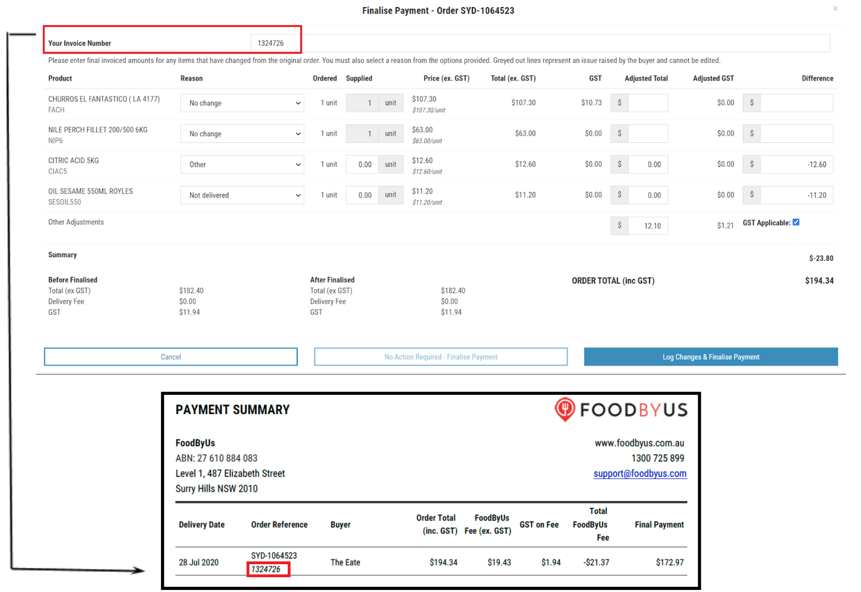
5. Adjust any items by working from left to right, starting with a reason. Select an adjustment reason from the drop down and then complete the designated ‘supplied’ field or ‘adjusted total’ field.
Adjustment Reasons:
- Not delivered: this could be due to out of stocks or changes to the quantity supplied (partially supplied)
- Substitution: the item ordered by the customer is not available, but a comparable substitute in likeness and cost can be supplied in its place
- Random weight: items charged by the kilo, that can vary in weight. This generally applies to fruit & veg, meat, seafood
- Additional adjustment reasons; poor quality, damaged, other
6. Once you have finished the adjustments, review the FoodByUs order total at the bottom to ensure that it matches the invoice in your system. To lodge the adjustment, click 'Log & Finalise Payment'.

You will then return to the main screen. You will know the adjustment has been successfully lodged if a tick appears next to the order reference under 'Finalised by Supplier'. Your invoice number will also appear under our Order Reference if you entered one.